Setting up Incident Managers
Last updated: September 10, 2026
Incident Managers review new Event Reports and coordinate the handling of confirmed Incidents. Admins can assign one or more Incident Managers for the company and its legal entities.
Only users with admin access can be selected as Incident Managers.
Assign Incident Managers
Go to Settings.
Open Legal Entities.
Select your main legal entity or the subsidiary you want to configure.
Find Data Privacy and Information Security positions.
In the Incident Manager field, select one or more users.
Save your changes.
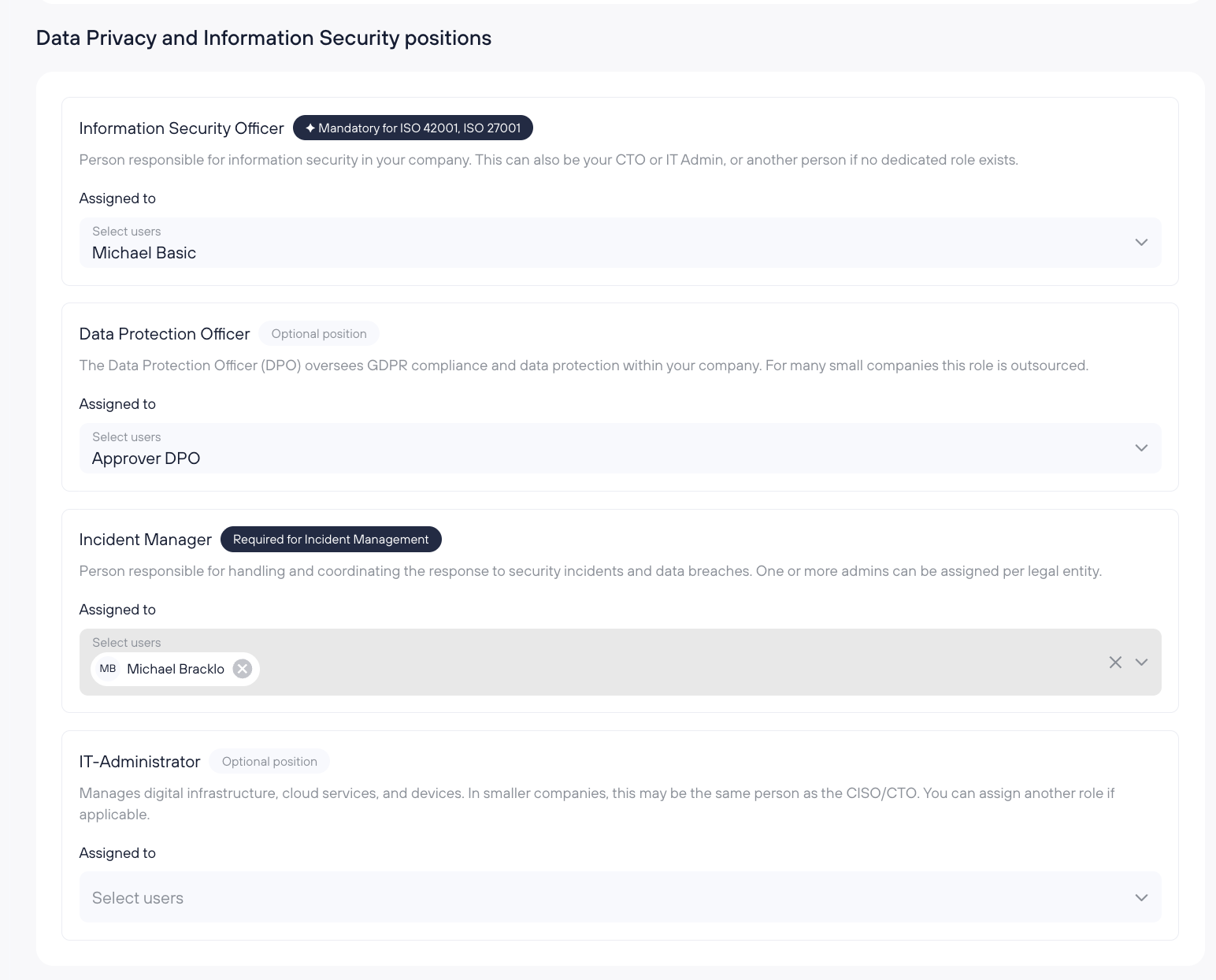
New Event Reports are routed to the configured Incident Managers.
Configure Incident Managers for several legal entities
Incident Managers assigned to your main legal entity also handle reports for its subsidiaries. They appear automatically in each subsidiary's settings. To change these assignments, select your main legal entity under Settings > Legal Entities.
You can add Incident Managers for an individual subsidiary. Reports from employees in that subsidiary go to both the Incident Managers assigned to the main legal entity and the additional managers assigned to that subsidiary.
If an employee belongs to several legal entities, reports go to the Incident Managers responsible for those entities. If the employee has no legal-entity assignment, reports go to the Incident Managers assigned to your main legal entity.
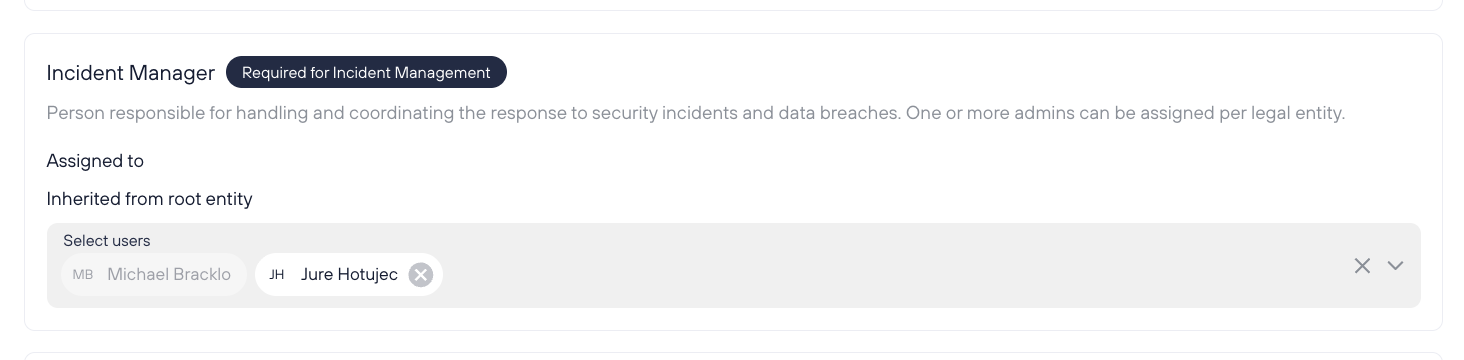
What happens if no Incident Manager is configured?
If neither your main legal entity nor the relevant subsidiary has an Incident Manager assigned, Kertos assigns new reports to the first company admin.
If your main legal entity has no Incident Managers configured, admins are prompted to set them up in Incidents. Existing Incidents remain available and can still be managed.
Changing the Incident Manager assignment
You can add or remove Incident Managers in the same settings at any time. The new assignment applies to Event Reports submitted after the change.
Changing this setting does not replace the people already assigned to existing Incidents.
Frequently asked questions
Can a basic user be an Incident Manager?
No. Only users with admin access can be selected.
Can we assign more than one Incident Manager?
Yes. You can select several Incident Managers for your main legal entity and add managers for individual subsidiaries.
Does assigning an Incident Manager change existing Incidents?
No. Existing Incidents keep their current assignees.
Do all legal entities need the same Incident Managers?
No. The Incident Managers assigned to your main legal entity cover all subsidiaries, and you can add managers for individual subsidiaries.
Related guide
Once Incident Managers are configured, see Assessing and managing incidents.