Controls 2.0: what is new
Last updated: October 29, 2026
Controls 2.0 changes how your control sets are built in Kertos. Every framework now has its own native controls, taken from the source text of the framework itself, and the implementation work underneath them is shared across frameworks.
If you are picking a migration date in the in-app announcement, this page explains what you get, what happens on the day, and what stays untouched.
Nothing you have already done is lost. Your evidence, your control status, your owners, your notes and your linked risks all carry over. There is no downtime, and you do not need to prepare anything.
What you get
1. Do the work once, satisfy every control that asks for it
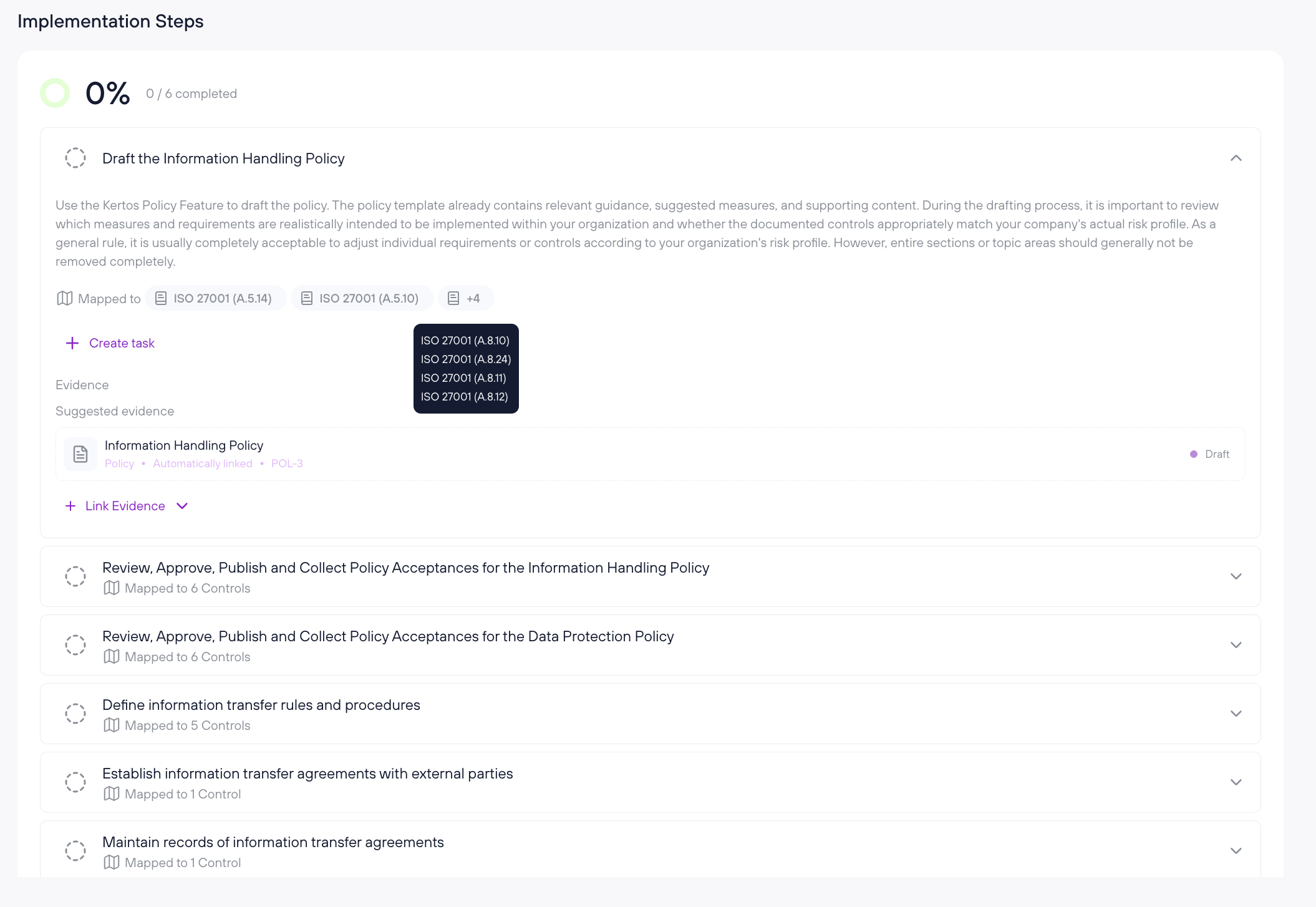
Implementation steps are now shared across frameworks. Where ISO 27001 and NIS2 require the same action, there is one step. You complete it once, and it counts for every control in every framework that references it.
ISO 27001 and NIS2 share roughly half of their implementation steps. If you add a second framework later, a large part of it is already implemented.
2. Content written with auditors
Every control comes from the framework itself: ISO/IEC 27001:2022 Annex A, Art. 21 NIS2, SOC 2 Trust Services Criteria. Each control and each implementation step was reviewed by our compliance experts and external auditors before release.
What you implement in Kertos is what your auditor asks for.
3. Guidance that tells you what to do and what to hand over
Each implementation step now states the concrete action and the evidence an auditor expects for it. Evidence sits at step level, so it travels to every framework that references that step instead of being uploaded again per framework.
4. Your own framework, not a translation of it
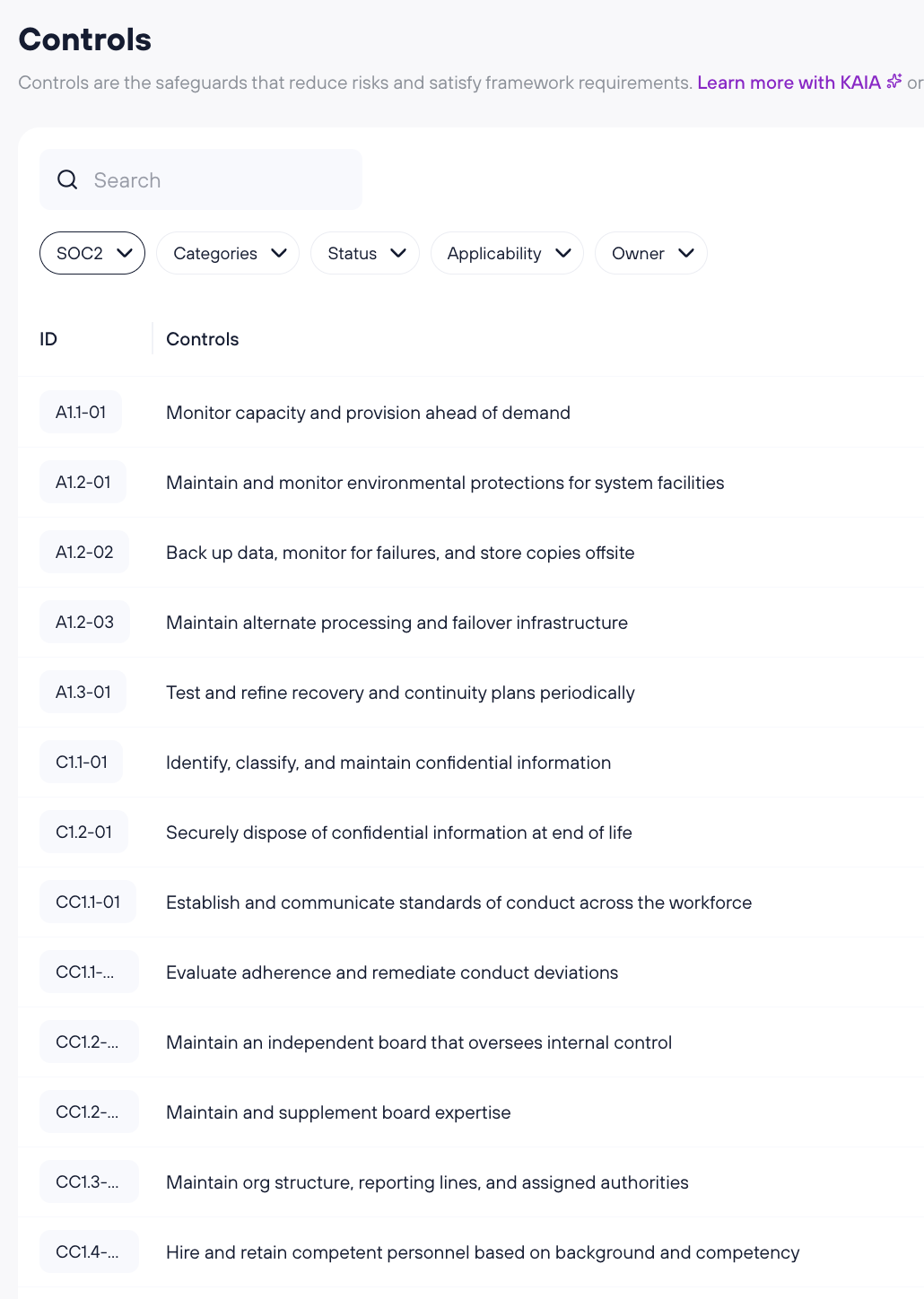
Until now, NIS2 and SOC 2 customers worked through ISO 27001 baseline controls with a mapping behind them. After migration you see NIS2 controls with NIS2 identifiers, and SOC 2 controls with SOC 2 identifiers.
What changes in your workspace
ISO 27001 controls
Before: Annex A controls. Now: the same controls, unchanged, with new implementation steps underneath them.
NIS2 controls
Before: shown to you as ISO 27001 baseline controls. Now: native NIS2 controls with their own identifiers.
Implementation steps
Before: attached to a single control. Now: shared units, linked to every control across every framework that requires the same action.
Evidence
Before: attached at control level. Now: evidence on a control stays on that control. Evidence on implementation steps moves to the new shared steps and is reused across frameworks.
Framework progress
Before: derived from control status. Now: derived from completed implementation steps.
What carries over
Our engineering team applies a mapping table that our compliance experts built and reviewed control by control, step by step. The migration then moves your data onto the new structure.
On your controls, these fields are carried over:
Control status (To do, In progress, Implemented). A control that was implemented before the migration stays implemented afterwards.
Owner
Effective from
Applicability, including your justification for "not applicable"
Notes
Attached evidence, both uploaded files and links
Linked risks
On your implementation steps, these fields are carried over:
Completion status, taken from the step it maps to
Linked tasks, including their assignees and due dates
Frameworks outside the current scope, such as TISAX, C5 and DORA, are not affected by this migration. Native control sets for them follow later, and we will contact you before anything changes there.
What happens on the day you pick
We run the migration on your workspace outside your working hours, usually in the evening.
Kertos stays available throughout. There is no maintenance window and no downtime.
Your Controls tab shows the new control sets the next time you open it.
We check your workspace afterwards and compare your framework progress before and after. If something looks off, we fix it before you notice it.
Your Kertos contact is available for questions in the days after.
FAQ
Do I have to do anything to prepare?
No. The migration runs in the background. You do not need to export anything, and you do not need to re-upload evidence.
Will I lose progress?
No. Your control status, evidence and completed work carry over. A control marked as implemented before the migration stays implemented afterwards, even where new implementation steps were added underneath it.
My framework progress percentage looks different. Why?
Framework progress is now calculated from completed implementation steps instead of control status, and some controls gain new steps. Nothing is deleted or reset, and your controls keep the status you gave them. We compare your framework progress before and after the migration to make sure it does not drop. In most cases it goes up, because shared steps remove duplicate work. Your Kertos contact can walk you through the numbers for your workspace.
My notes or my justification text look stitched together.
Where controls were merged, the text from each source is kept and combined, with an indication of which control each part came from. Nothing was dropped. You can edit the field freely.
A merged task has a due date I did not expect.
Where several tasks merged into one, the earliest due date wins. Adjust it if that does not fit your plan.
Does my certificate or my audit evidence stay valid?
Yes. The migration changes how controls are structured in Kertos. It does not change what you have implemented or what you have documented. Your evidence stays attached and stays exportable.
Do I need to reassign evidence to new controls?
No. There are no new ISO 27001 controls, so evidence on a control stays on that control. Only evidence that was linked to implementation steps moves to the new implementation steps, based on a mapping our compliance experts built.
Will my integrations and Device Monitor keep working?
Yes. Integrations and Device Monitor keep working as before.
Will my review dates and reminders stay in place?
Yes. Your review dates and reminders carry over.
Does the migration change my policies, users, vendors or trust page?
No. The migration only changes the control structure. Your policies, users and vendors stay as they are, and your public trust page does not change, because your ISO 27001 controls stay the same.
Who do I ask if something looks not as I expected after the migration?
Your usual Kertos contact. Send a short description and a screenshot of the control or step in question, and we will look at your workspace directly.